CreditWise from Capital One
- 4.6
- Rating
- 5.00M
- Installs
- Free
- Price

 Analysis by App-foxy
Checking a credit score can feel more stressful than it should. I installed CreditWise from Capital One to see whether it makes that task clearer and easier to manage, rather than simply placing another financial dashboard on my phone. My overall impression is that it is a focused finance app for people who want regular access to credit information and monitoring without paying for the app itself. It is free, rated for Everyone, and developed by Capital One Services, LLC.
What makes it worth considering is its narrow purpose. This is not an all-purpose banking replacement, a budgeting suite, or a tool for managing every account in one place. Its value comes from helping you keep an eye on your credit position and notice changes that deserve attention. That focus can be reassuring, but it also means the app is most useful when you already understand what credit monitoring can and cannot do.
What I found when using CreditWise
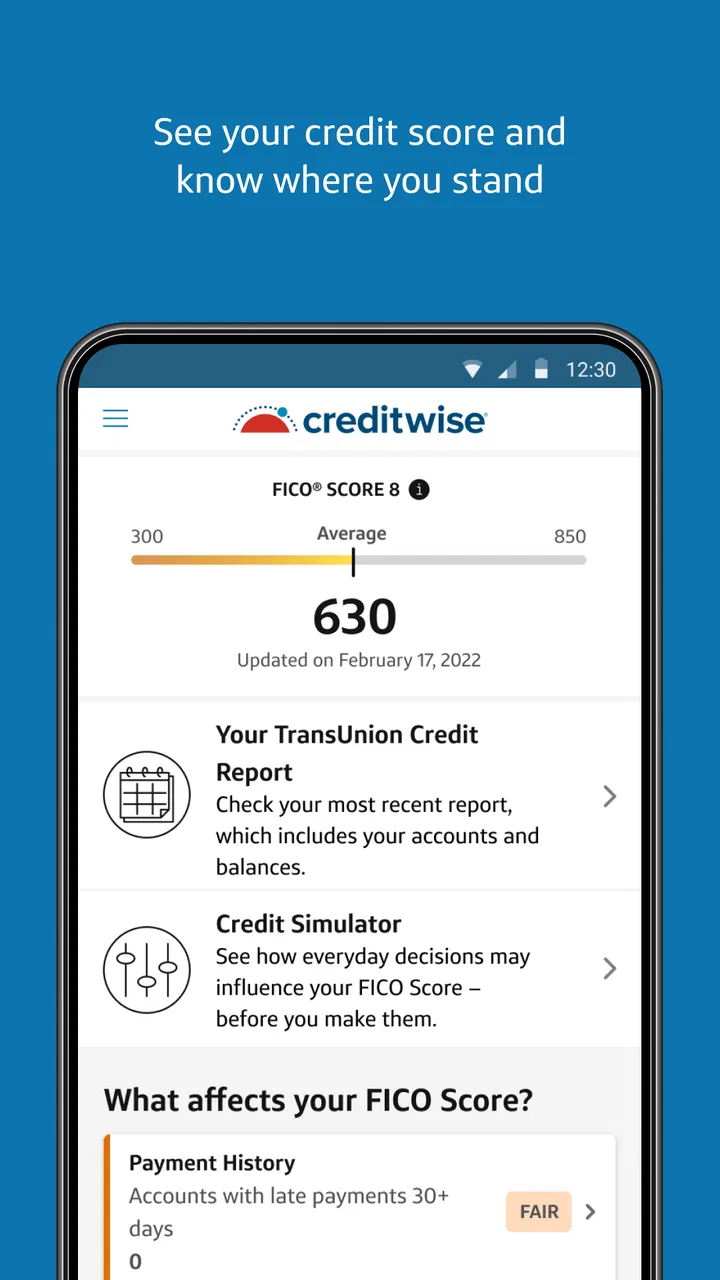
The first thing I noticed is that CreditWise is built around a simple question: what is happening with my credit, and should I investigate it? That is a more practical starting point than burying the important information beneath spending charts, savings goals, or promotional material. The interface is aimed at quick checks, so I could imagine opening it briefly rather than treating it as a daily financial journal.
You May Also Like

 Blood Strike: 2.5 Anniversary
Blood Strike’s Loadouts Turn Every Drop Into a Tactical Gamble
A close look at Blood Strike’s custom loadouts: how fast access to signature weapons reshapes its battle royale rhythm, rewards preparation, and narrows the gap between fights.

 Pandora - Music & Podcasts
Pandora’s Music Is Easy to Start, but Harder to Recover
Pandora’s strength is its low-effort path from a seed to a station. Its weak spot is how much confidence it asks you to place in connection, setup, and quiet recovery.

 8 Ball Pool
 Is Built on Rivalries, Rematches, and Routine
A close look at the rivalries, rematches, shared routines, and unanswered safety questions that turn a quick pool match into a persistent mobile community.

 Samsung Music
’s Quiet Strength Is Playing What You Already Own
Its reach comes less from spectacle than from dependable access to a personal library. That simplicity is both the app’s strongest retention engine and its ceiling.

 AccuWeather: Weather Radar
AccuWeather Review: A Quick, Clear Forecast for Everyday Decisions
For everyday plans, the best forecast is the one you can understand quickly. AccuWeather makes rain timing, radar, and local conditions easy to act on, with a few trade-offs.

 Hill Climb Racing
Why Hill Climb Racing Still Turns Crashes Into One More Run
A tiny car, a bumpy hill and one more upgrade: Hill Climb Racing keeps resurfacing because its simple chaos makes every near-miss feel personal.
More From Our News Desk



Its published store summary describes free credit score and monitoring, which matches the way I approached it. I would use it as a regular checkpoint, especially before applying for a card, arranging a loan, renting a home, or reviewing my broader financial habits. I would not use one screen in the app as the sole basis for a major decision. A credit score is useful context, but lenders can consider other information and may use different scoring methods.
The app has a 4.6 average from around 116 thousand ratings, with more than 5 million installs. Those figures suggest that it has reached a substantial audience, but popularity is not the same as suitability. The more important question is whether you want a dedicated monitoring tool or a broader financial platform that combines credit information with banking and budgeting.
A realistic everyday use case
Imagine that I am preparing to apply for an apartment. Instead of waiting until the application is submitted to think about my credit, I can make CreditWise part of a short preparation routine. I would check the current information, look for anything unfamiliar, and then review my own records before contacting a landlord or lender. If something appears inconsistent, I would investigate it through the appropriate financial institution or reporting channel rather than assuming the app itself can resolve every issue.
That workflow is more valuable than repeatedly checking out of curiosity. The app becomes a prompt to review my financial identity at sensible moments. It can also help me notice a change early enough to ask questions, although early visibility is not the same as automatic correction or guaranteed protection from fraud.
Trust starts with clear boundaries
Financial apps deserve a higher level of scrutiny than entertainment apps because the information involved can affect real decisions. My trust in CreditWise therefore depends less on polished screens and more on whether I understand what I am viewing, what actions I can take, and where the app’s responsibility ends. Capital One Services, LLC is clearly identified as the developer, which gives the product a recognizable ownership context, but that alone should not replace reading the app’s current privacy and account information before signing up.
I recommend paying attention during setup instead of tapping through every screen automatically. Read the explanations connected to account access, identity verification, notifications, and data handling. If the app presents a choice, make that choice deliberately. A credit-monitoring service is only comfortable when you know why information is requested and how you can manage your relationship with the service later.
Because this is a finance app, I would also keep my phone protected with a strong device passcode and current system updates. CreditWise cannot compensate for an unsecured phone or an email account that is easy for someone else to enter. I would avoid checking sensitive information on a shared device and would sign out or remove access if I stopped using the service.
Controls I would check before relying on it
One of the most useful habits is to review the app’s notification settings after installation. Monitoring alerts are only helpful if they reach me at the right time and do not become background noise. I would keep alerts that help me notice meaningful account or credit activity, while reducing anything that feels unnecessary. If I receive an unexpected message, I would open the app directly rather than trusting a link in an email or notification.
I would also inspect the account and security controls available inside the app and through the relevant account-management screens. Look for ways to update contact details, manage sign-in protection, review connected access, and close or change the account if needed. I am careful here because menus can change between releases, and a control that is visible on one device or account may not appear in exactly the same place for everyone.
The current version is 1.147.2 and the minimum operating system is iOS 11 or later. Keeping the app and the phone’s operating system current is a small but important part of using a financial service responsibly. If your device cannot meet that requirement, I would not try to work around it with an unofficial download. A finance app is a poor place to compromise on software integrity.
I would make a note of the email address or phone number associated with the account, too. Losing access to those recovery channels can turn a simple sign-in problem into a lengthy support issue. Before relying on monitoring, make sure the contact details are current and that you can recognize legitimate messages from the service.
Where data sensitivity matters most
The most sensitive moment is not necessarily the first time I see a score. It is the moment I connect identity details or respond to a security prompt. I slow down there. I check that I am using the official app from the legitimate store, confirm that the developer name matches Capital One Services, LLC, and avoid entering information after following an unsolicited message.
I would read the app’s privacy disclosures and permission prompts in context. The exact choices available can depend on the operating system and the version installed, so I would not assume that another person’s setup looks identical to mine. The practical rule is simple: if a permission does not make sense for the task I am performing, I pause and investigate before allowing it.
Notifications also deserve care. A lock-screen alert can reveal more than I want someone nearby to see. I would consider hiding sensitive previews while keeping alerts enabled, particularly if I share a home, commute by public transport, or use a work phone. That is a small user-controlled adjustment, but it makes monitoring more private without abandoning the benefit of being notified.
Another important distinction is between monitoring and repair. If I see unfamiliar activity, I would capture the relevant details, check my own accounts, and contact the appropriate institution using a trusted channel. I would not assume that tapping through a CreditWise screen automatically disputes an item, freezes every account, or restores my identity. The app can be part of the detection process; it should not be treated as the entire response plan.
How much control does the user really have?
For me, user agency means being able to decide when to check, what notifications to receive, which information to provide, and whether to continue using the service. CreditWise works best when I treat it as an instrument rather than an authority. I can use its information to ask better questions, but I still decide whether a credit application is sensible, whether an unfamiliar item needs escalation, and whether another source should confirm what I am seeing.
I would avoid turning the score into a personal target that dictates every financial choice. Scores can move for reasons that are not immediately obvious, and a change does not automatically mean that I have made a mistake. The healthier workflow is to look for meaningful patterns, compare them with my own records, and act calmly when something needs attention.
There is also a useful trade-off between convenience and concentration. A dedicated app is easier to open than a collection of lender websites, and the focused presentation can make monitoring feel less intimidating. On the other hand, it may not replace the broader picture available through a bank app, a budgeting service, or direct account statements. If I want spending categories, cash-flow planning, bill reminders, and credit monitoring together, I would probably prefer a more comprehensive financial platform.
If I already use Capital One products, the app may fit naturally into my routine. If I do not, I would still judge it on the clarity of its onboarding, the account controls it exposes, and how comfortable I feel with the information requested. I would not open an account solely because the app is free. Free access is helpful, but privacy choices and practical usefulness matter more than the price tag.
Who should use it, and who should skip it?
I think CreditWise is a good match for someone who wants a straightforward way to stay aware of credit information without paying for a separate monitoring app. It is especially suitable for a first-time credit user who needs a regular reminder to review their position, or for someone preparing for a major application and wanting an additional checkpoint before submitting paperwork.
It can also suit a person who has previously missed an unfamiliar change because they rarely review financial records. In that case, a monitoring-focused tool may create a useful habit. I would set a recurring personal review schedule, then record questions or discrepancies in a secure note rather than relying on memory. The app is more effective when paired with that small organizational step.
I would skip it as my primary solution if I need detailed budgeting, investment management, full transaction aggregation, or hands-on debt repayment planning. I would also be cautious if checking scores tends to make me anxious or encourages constant refreshing. Monitoring should support sensible decisions, not become another source of financial stress.
People who need a complete identity-theft response plan should look beyond this single app. A monitoring view can help reveal a problem, but serious incidents may require contacting card issuers, banks, credit reporting organizations, law enforcement, or other relevant services. The right response depends on what actually happened.
What I would do after installing it
I would begin by confirming the developer and installing only through the official app marketplace. After creating or accessing an account, I would read the privacy and security explanations, verify recovery details, and decide how much notification information should appear on my lock screen. I would then make one calm baseline check rather than immediately reacting to every detail.
Next, I would compare what I see with my own recent financial activity. That comparison is a valuable safeguard because it separates a genuine surprise from a misunderstanding about timing, account ownership, or scoring information. If something does not match, I would document the date and description, then contact the relevant provider through a trusted number or website.
Finally, I would schedule occasional reviews around real-life events: before applying for credit, after changing important account details, or when I am conducting a broader financial checkup. I would update the app normally and remove it if I no longer trust the account setup or no longer need the service. Keeping an app installed forever is not the same as using it responsibly.
My cautious verdict
CreditWise from Capital One is a focused, free finance app that I would recommend to readers who want accessible credit monitoring and are willing to remain involved in the process. Its strongest quality is its clear purpose: it encourages me to check credit information without pretending to be a full financial command center.
My recommendation comes with an important condition: use CreditWise as an early-warning and review tool, not as a complete financial protection plan. Read the privacy information, make deliberate permission choices, protect your sign-in and recovery channels, and verify unexpected activity through trusted sources. Those habits matter as much as the app itself.
The 4.6 average and broad adoption make it an appealing starting point, while the Everyone age rating and free price remove common barriers to trying it. Still, the right choice depends on your needs. If you want a concentrated way to keep credit on your radar, it is a sensible option. If you need budgeting, account aggregation, or detailed financial planning, another service will serve you better. I would install it for awareness, keep control of my data choices, and treat every important financial decision as something that deserves more than one screen.
FAQs for CreditWise from Capital One
01What is CreditWise and how does it work?
CreditWise is a free credit monitoring app from Capital One that helps you track your credit score and report. It provides users with weekly updates, alerts on significant changes, and insights on factors affecting your credit. Even if you’re not a Capital One customer, you can use CreditWise to monitor your credit.
02Is CreditWise really free to use?
Yes, CreditWise is completely free to use. There are no hidden fees or charges, even if you’re not a Capital One customer. You get access to your TransUnion credit score and report, along with personalized tips to improve your credit health, all without any cost.
03How does CreditWise protect my personal information?
CreditWise employs robust security measures to protect your personal information. It uses advanced encryption to safeguard your data and secure login methods to ensure only you can access your account. Additionally, it provides alerts if your Social Security Number is found on the dark web.
04Will using CreditWise affect my credit score?
No, using CreditWise will not affect your credit score. Checking your credit score through CreditWise is considered a "soft inquiry," which does not impact your score. Feel free to check your credit as often as you need without worrying about negative effects.
05What should I do if I notice an error on my credit report through CreditWise?
If you spot an error on your credit report, CreditWise provides guidance on how to dispute it. You can initiate the dispute process directly with the credit bureau reporting the error. CreditWise offers resources and steps to help you correct any inaccuracies effectively.
Pros
- User-friendly interface with intuitive navigation.
- Free credit score tracking and updates.
- Alerts for changes to your credit report.
- Personalized tips to improve credit health.
- No impact on your credit score for checking.
Cons
- Limited to TransUnion credit data only.
- Requires a Capital One account to access.
- Some features not available outside the U.S.
- May show ads for Capital One products.
- Lacks in-depth financial analysis tools.

CreditWise from Capital One
Gallery